

You can turn on the on the top left of the remote control. (circled in red)
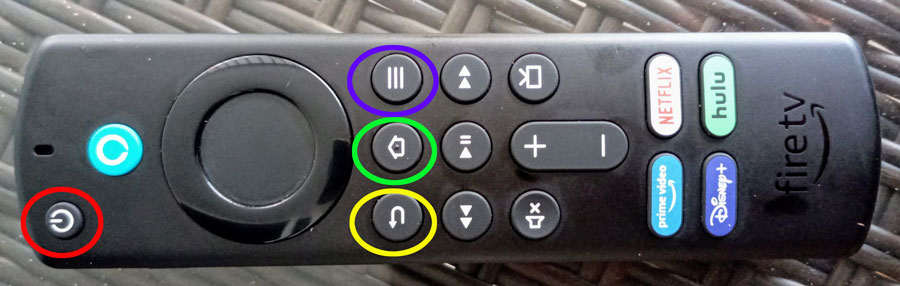
When the TV comes on it could be on the last channel watched, the channel guide or the home screen. If you see a screen like this:
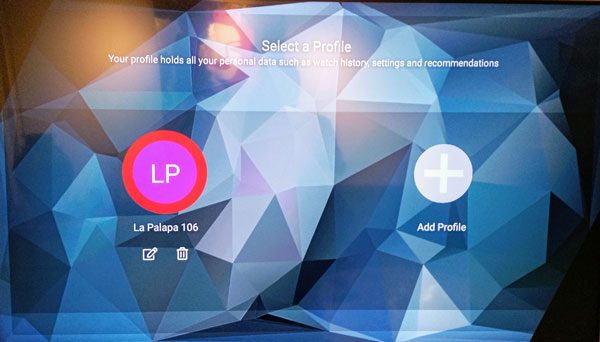
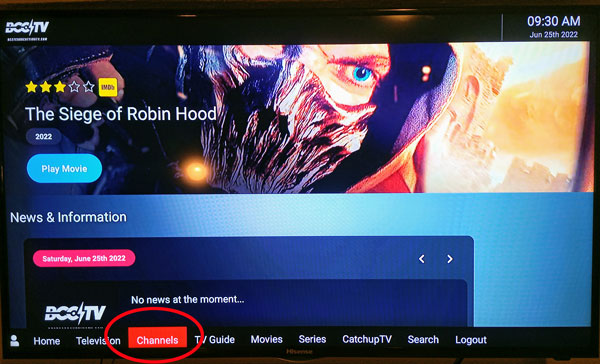
Click on the LP profile and it will bring you to the home screen. (this is the home screen) The best option on this screen is The “Channels” button or the “TV Guide” button.
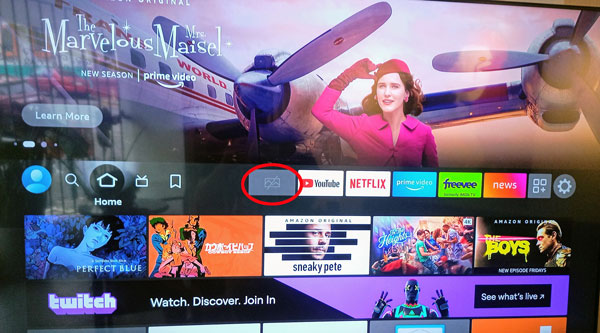
If the screen is locked or you are having problems you can always relaunch the app by hitting the home button on the remote (circled in green) and toggle to this app (circled in red) that will bring you back to the screen above where you will click on “LP” and start over.
Vista del Sol Condo 111
Vista del Sol Condo 114
Vista del Sol Condo 115
Vista del Sol Condo 206
Vista del Sol Condo 214
Vista del Sol Condo 215
Vista del Sol Condo 304
Vista del Sol Condo 361703
Vista del Sol Condo 415
Vista del Sol Condo 505
Vista del Sol Condo 604
Vista del Sol Condo 606
Vista del Sol Condo 610
Vista del Sol Condo 611
Vista del Sol Condo 702
Vista del Sol Condo 711
Vista del Sol Condo 712
Vista del Sol Condo 715
Vista del Sol Condo 802
Vista del Sol Condo 805
Vista del Sol Condo 812
Vista del Sol Condo 902
Vista del Sol Condo 904
Vista del Sol Condo 908
Vista del Sol Condo 915